Spellcast Style Checker
Spellcast Style Checker is a document formatting tool that reads your document text to check for style guide consistency, defined terms, and formatting and cross-referencing errors.
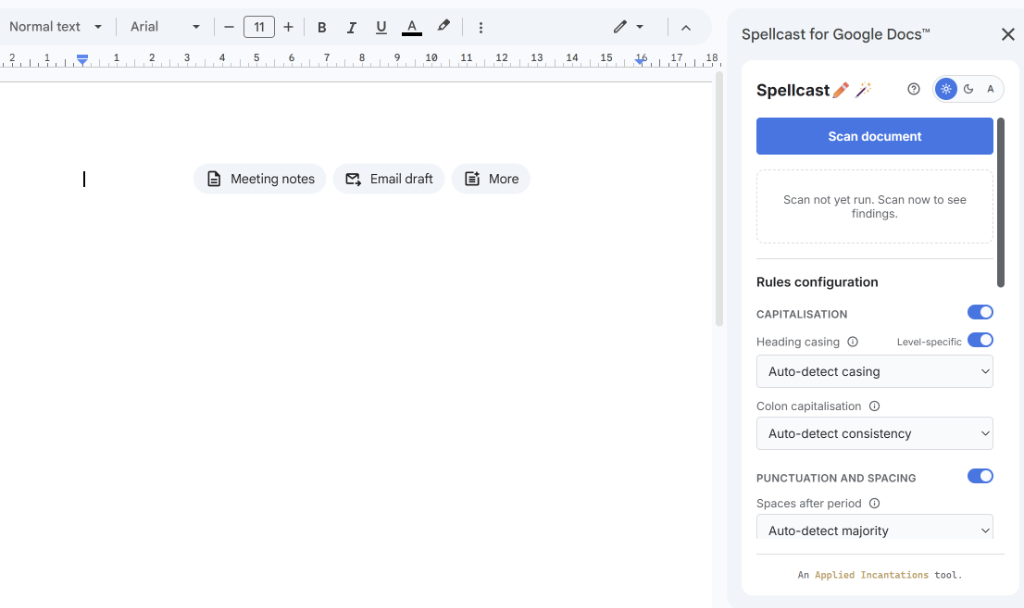
Polished and consistent documents, at the touch of a button.
You like single spacing after a full stop. Your boss likes two, but never uses them consistently. Headings are sentence case on page one, title case by page ten. Something was defined and never used. Two numbers that were meant to match don't. A list opens at the bottom of a page and its first item is at the top of the next.
Most of this is quick to fix, but finding it all takes the kind of slow, systematic attention that should be going somewhere more useful. Spellcast catches it and fixes what it can, so you don't have to. Now, documents stay polished while spending less of your precious time and energy.
Free Public Good
Get Spellcast
A free alternative to Definely and Litera Check that runs completely locally. No sales calls, no subscriptions.
Need support? Check the Spellcast Support & User Guide.
Why Spellcast is different
Tools like Litera Check and Definely exist for this problem, but they're expensive enterprise licences, and they're stuck in Word. Spellcast does the same core job—for free, and across both Word and Google Docs—using the same rules engine on both platforms.
- Google Docs and Word. Same engine.Most document checkers in this space are Word-only. Spellcast runs on Microsoft Word (Windows, macOS, and Word Online) and as a Google Docs sidebar, and both use the same shared rules. Your style guide doesn't change depending on where someone drafted the document, so neither should the way you check it.
Nothing leaves the sandbox—your documents stay private. - It reads the document's own style first.You don't need to tell Spellcast that this document uses smart quotes, or that its headings are in sentence case. It reads the document's own conventions, works out the majority, and flags (and fixes) the exceptions. If you'd rather impose your own preferences to override what the document does, you can do that too.
- No subscription. No sales call. No vendor.Spellcast is free because the underlying problem shouldn't cost thousands of pounds a year to fix. It's built and maintained as a public good—and it works as well as the paid alternatives for the checks that matter.
What it checks
- Defined terms and glossaryA term that appears in bold at definition, plain text everywhere else. Another that's capitalised in one clause and lowercase in the next. Something defined on page two that was never referenced again. Checking all of this by hand should never fall to a human. Spellcast audits it and surfaces an interactive glossary panel.
- Typography and spacingStraight quotes mixed with smart ones. Two spaces after a full stop. En dashes where em dashes should be, or none of either. Spellcast checks quote style, sentence spacing, dash consistency, and capitalisation after colons—flagging anything that doesn't match the document's established convention.
- Page formattingA heading stranded at the foot of a page, with its content on the next. A paragraph sitting centred when everything else is flush-left. Spellcast checks that headings and list openings stay attached to what follows, and that alignment is consistent throughout.
- Cross-references"See clause 5 (six)" is an embarrassing error to send. Spellcast flags broken clause numbers, unlinked static cross-references, and cases where the number you've spelled out doesn't match the numeral before anyone else spots them.
- Drafting leftoversOpen brackets that were never closed.
[insert]placeholders.___underscores.TKmarkers. Spellcast does a final sweep so nothing from the drafting process survives into the version you send.